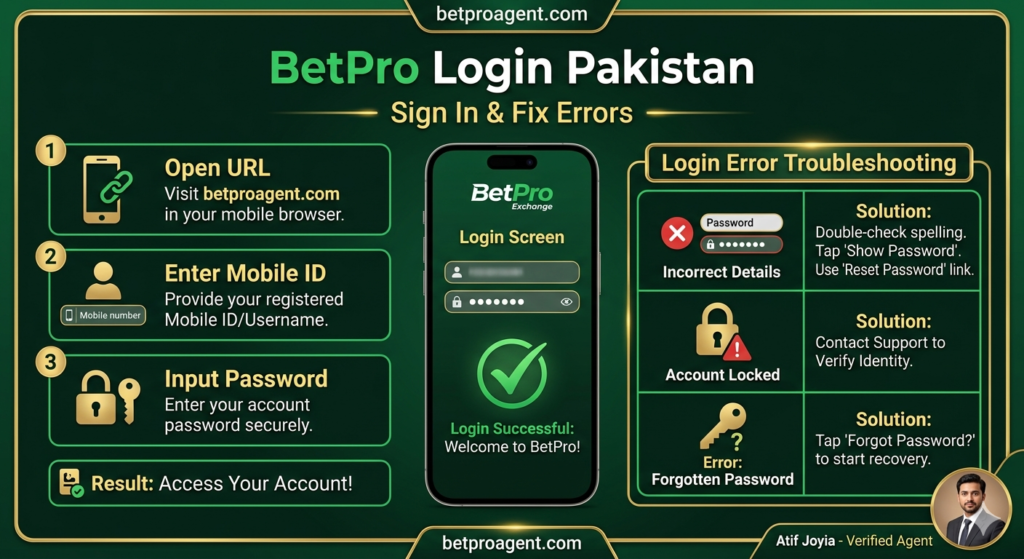
TL;DR: Logging into your BetPro account in Pakistan is simple when everything works — open the official BetPro Exchange URL, enter your mobile number and password, and you’re in. The problems usually start with PTA blocking the domain, forgotten passwords, or wrong login URLs. This guide walks you through the correct login process for 2026, the most common login errors Pakistani users see, and how to fix each one in under 5 minutes. If your BetPro login isn’t working in Pakistan right now, scroll to the troubleshooting section — your fix is probably there.
How BetPro Login Works in Pakistan
A BetPro login in Pakistan uses two credentials:
- Your Pakistani mobile number (+92) — this is your username
- Your password — the one you set during registration (not the initial one shared by your agent)
Unlike many international betting sites, BetPro does not require email-based login or 2FA app verification by default. Your phone number is your identity, and SMS verification (2FA) only kicks in when logging in from a new device or after a long inactivity period.
The platform runs on rotating domains (bpexch.live, betpro.net, and similar mirrors) because PTA periodically blocks the main one. This is the single biggest source of “login not working” complaints from Pakistani users — the credentials are fine; it’s the URL that’s broken.
اردو میں — BetPro Login Pakistan Kaise Karein?
BetPro mein login karna bohat asaan hai, agar saari cheezein theek chal rahi hain. Yeh hain steps:
- Working BetPro login URL kholein (bpexch.live ya betpro.net)
- “Login” ya “Sign In” button par click karein
- Apna +92 mobile number likhein
- Apna password likhein
- Login dabaayen — bas, aap dashboard mein hain
Agar login nahi ho raha to 90% cases mein wajah yeh hoti hai:
- ❌ PTA ne domain block kar diya — naya working link WhatsApp se mangwayein
- ❌ Password galat — “Forgot Password” use karein ya hamein WhatsApp karein
- ❌ Account inactive — 30 din se zyada use nahi kiya to hum dobara activate kar denge
- ❌ Mobile network slow — Wi-Fi try karein
Detail mein har problem ka hal neeche likha hua hai.
Step-by-Step: How to Login to BetPro in Pakistan
Step 1 — Open the correct BetPro URL
The official BetPro Exchange login URLs in Pakistan rotate between:
bpexch.livebetpro.net- And other mirror domains shared by support when needed
The simplest safe path: Bookmark betproagent.com/login on this site — when you click it, you’ll be routed to the current working domain automatically. This way you never have to remember which domain is active today.
⚠️ Never login through: Telegram links, random WhatsApp links from unknown numbers, or Facebook ads. These are typically phishing pages designed to steal your password.
Step 2 — Enter your mobile number
Type your registered +92 mobile number in the username/login field. Include the country code (+92) and your 10-digit number, no spaces or dashes.
Example format: +923001234567
Step 3 — Enter your password
Type the password you set after first login — not the initial password your agent shared during registration (you should have changed that on day one).
If you’ve never changed the initial password, that’s a security risk — change it immediately after this login session.
Step 4 — Click Login
The dashboard loads in 2–5 seconds. You’ll see:
- Your available balance at the top
- The main navigation: Cricket, Football, Casino, Aviator, etc.
- Your account menu in the top-right (profile, withdrawal, deposit, settings)
If you see the dashboard, your BetPro login in Pakistan was successful. Bookmark the current URL — this is the working domain for now.
Step 5 — (Recommended) Enable SMS 2FA
Once inside your account, go to Settings → Security and enable SMS 2FA. From now on, login from any new device will require an SMS code, which blocks 95% of unauthorized access attempts.